New Guard signals, live map, and staff actions now sit in one workspace
Rust

AegisRcon for Rust

One Rust RCON workspace for console, chat, players, reports, bans, Guard review, threat analysis, live map, detailed statistics, trigger automation, dynamic slots, plugins, permissions, and rank.

Dashboard

A customizable command center for the whole server

The dashboard is the first screen for the operation: population, queue, FPS, uptime, plugin state, reports, recent activity, Guard signals, and quick actions in one place. More widgets can be added as the panel grows.

  • Track the entire server from one personalized workspace
  • Keep live health, moderation, plugin, and automation signals together
  • Designed to grow with upcoming widgets and operator workflows
  • Useful for owners and staff who need fast context before opening deeper tools
AegisRcon customizable Rust dashboard
Console

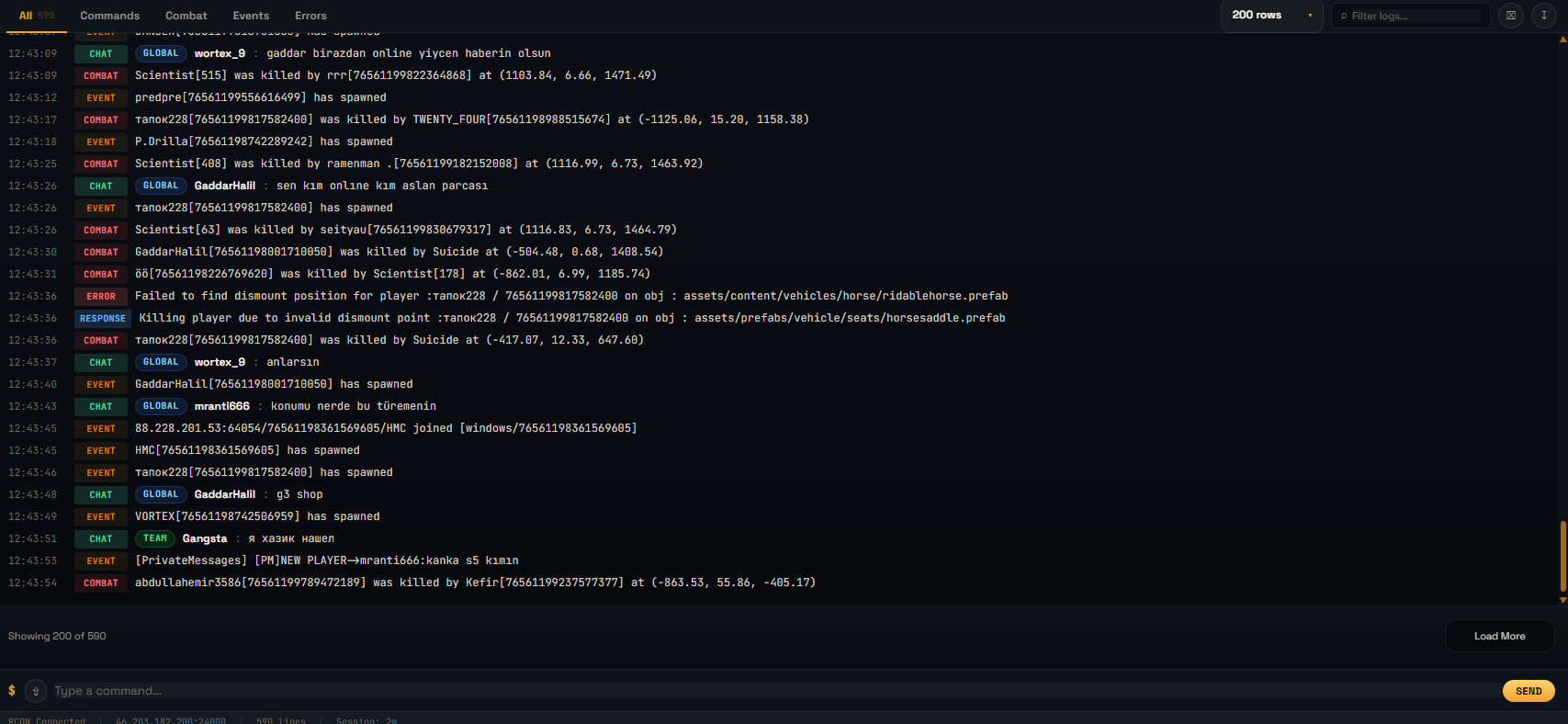
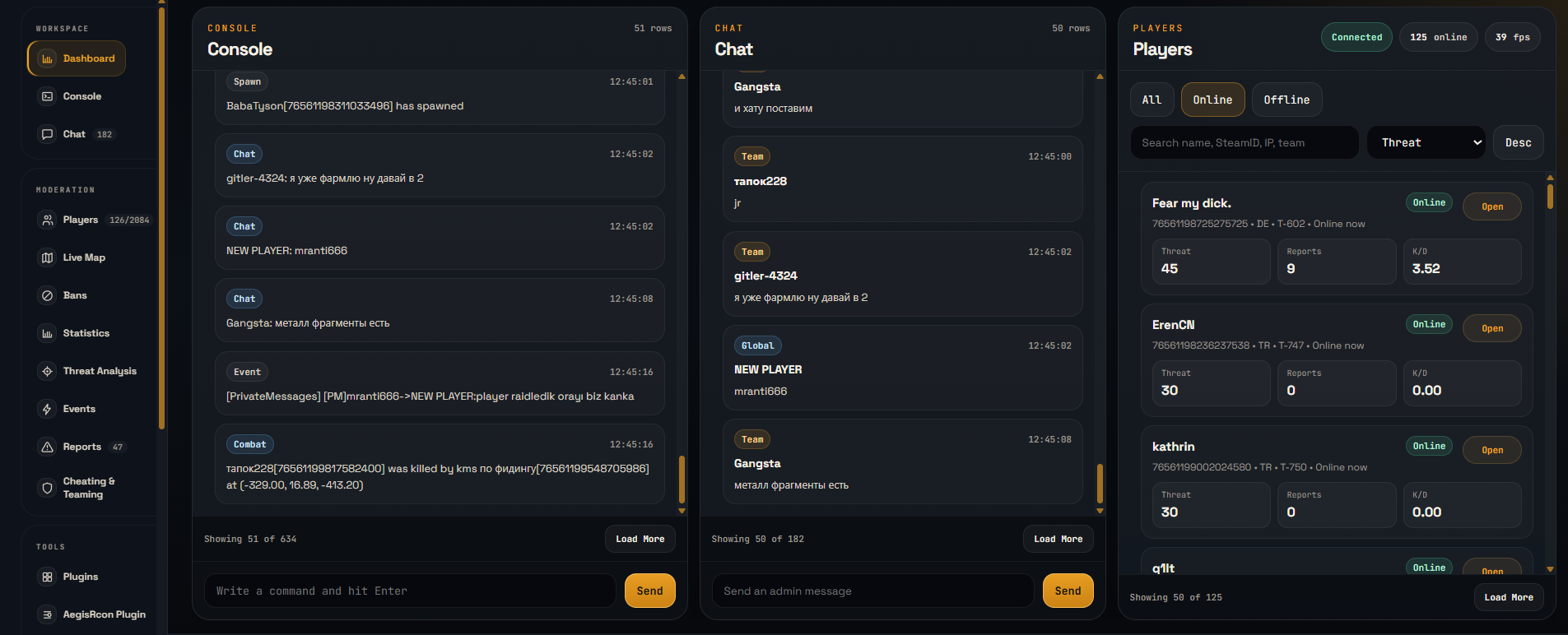
Live RCON console built for real server work

Run commands, filter logs, follow events, review errors, and keep risky actions visible. Free sessions stay active while the tab is open; Pro and Max keep persistent coverage running in the background.

  • Live command input and server output
  • Filters for commands, combat, events, and errors
  • High-risk command warnings and audit context
  • Free tab-active sessions, Pro/Max persistent background RCON
AegisRcon Rust console view
Chat

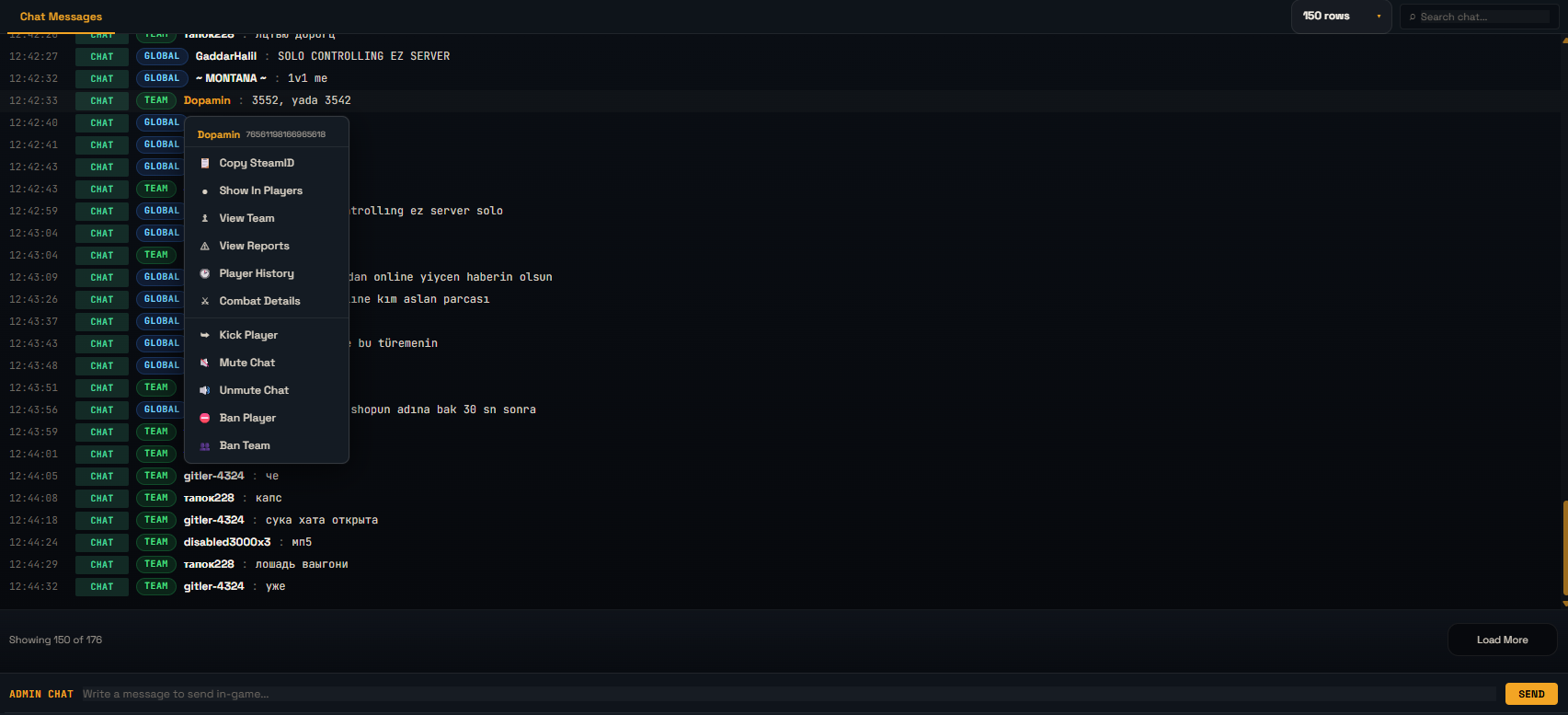
Chat moderation without losing player context

Follow global, team, local, clan, staff, and system chat from the same workspace. Jump from a message to the player, their SteamID, history, reports, combat details, or moderation actions.

  • Searchable chat feed with readable channel badges
  • Send admin chat messages from the panel
  • Open player actions directly from chat messages
  • Mute and unmute workflows stay close to evidence
AegisRcon Rust chat moderation view
Players

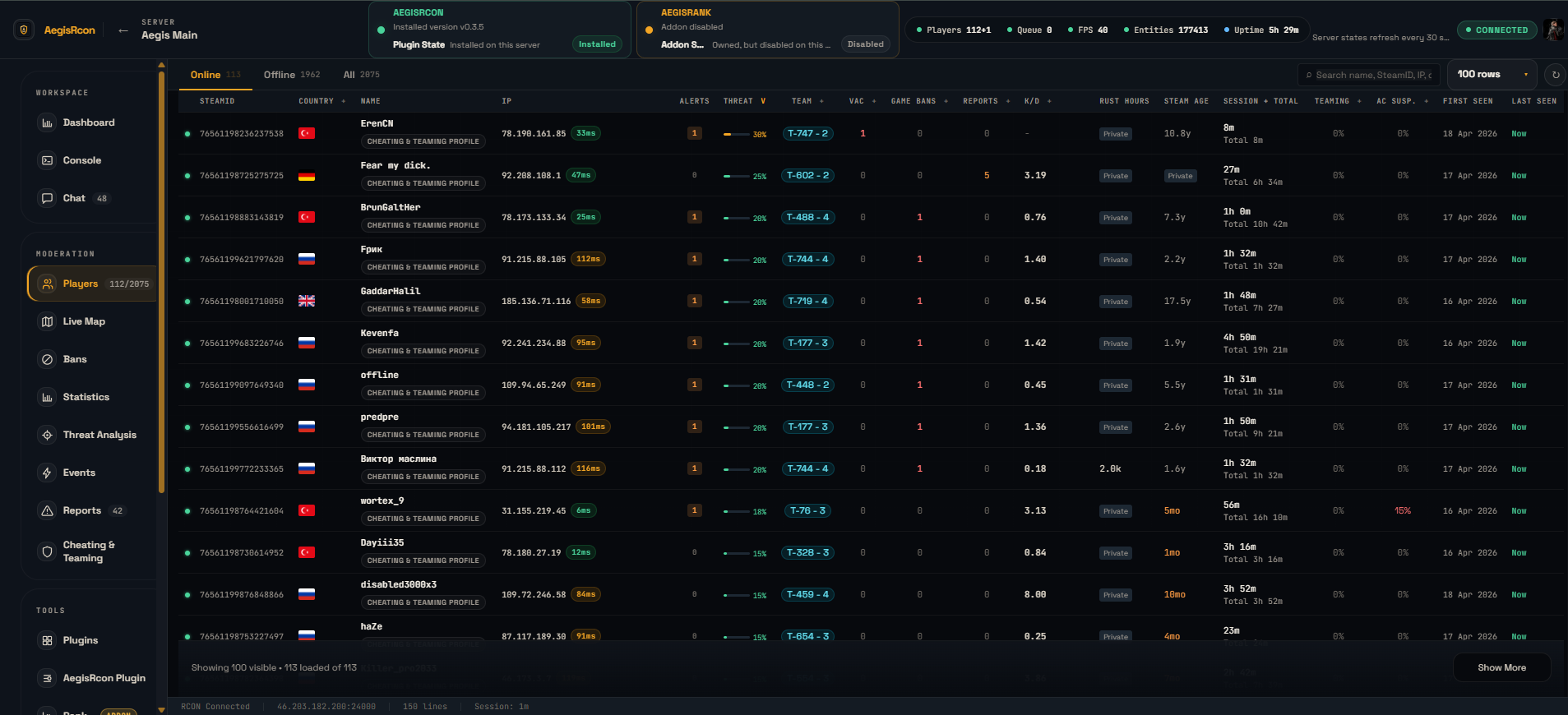
Players, identity, IP signals, and team context

See online and offline players with SteamID, IP, country, ping, playtime, team context, reports, alerts, and threat signals before you act.

  • Online, offline, and all-player views
  • Search by name, SteamID, IP, or team
  • VPN/shared-IP warnings before IP-based moderation
  • Quick access to reports, history, combat, team, kick, mute, and ban actions
AegisRcon player management view
Guard Center

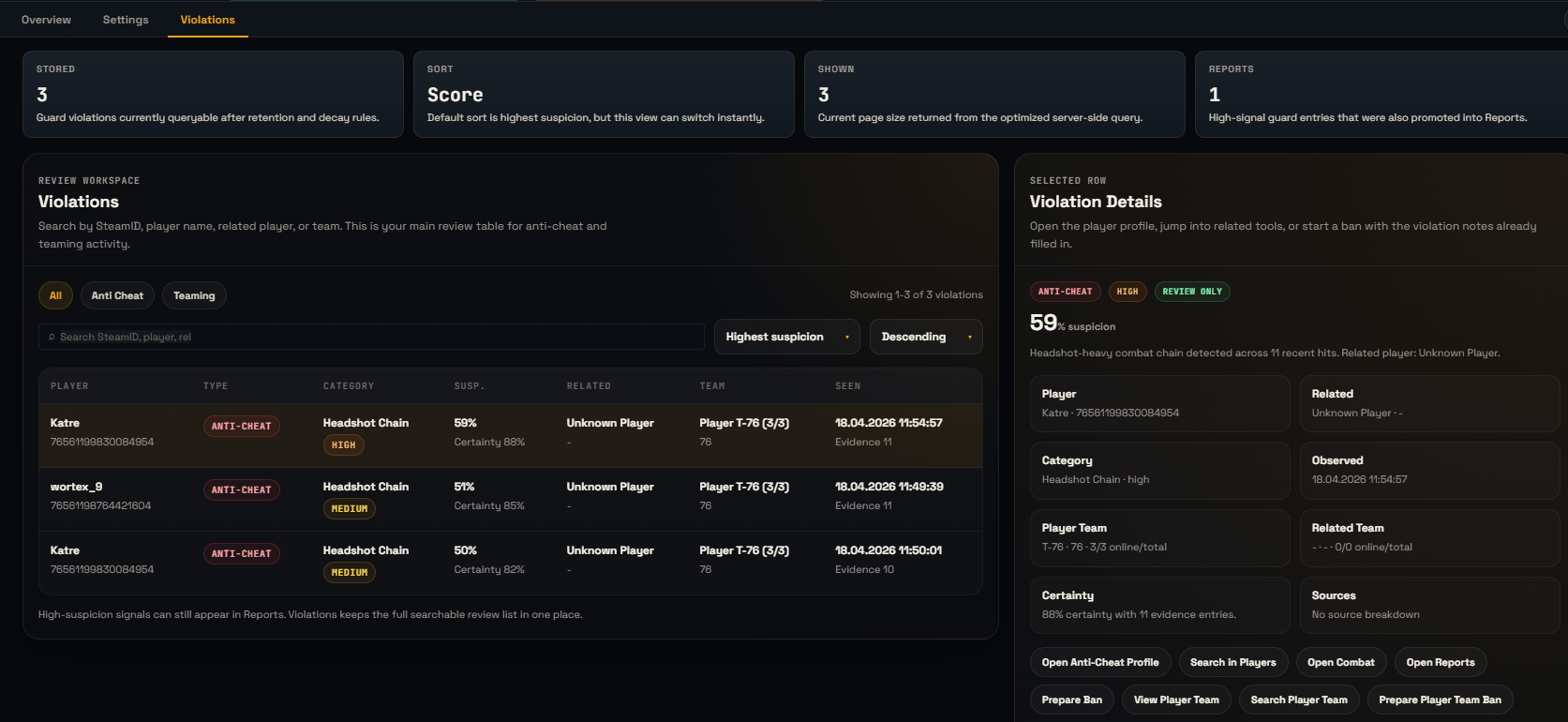
Anti-cheat and teaming review in one place

Guard combines combat signals and unofficial teaming context so staff can review suspicious behavior with surrounding evidence instead of guessing from one line of console output.

  • Combat hit and shot streams for suspicious patterns
  • Code lock, cupboard, turret, bag, revive, vehicle, corpse, and raid context
  • Configurable thresholds and review settings
  • Violation detail cards for staff investigation
AegisRcon anti-cheat and teaming review
Threat Analysis

A review queue for the players that need attention first

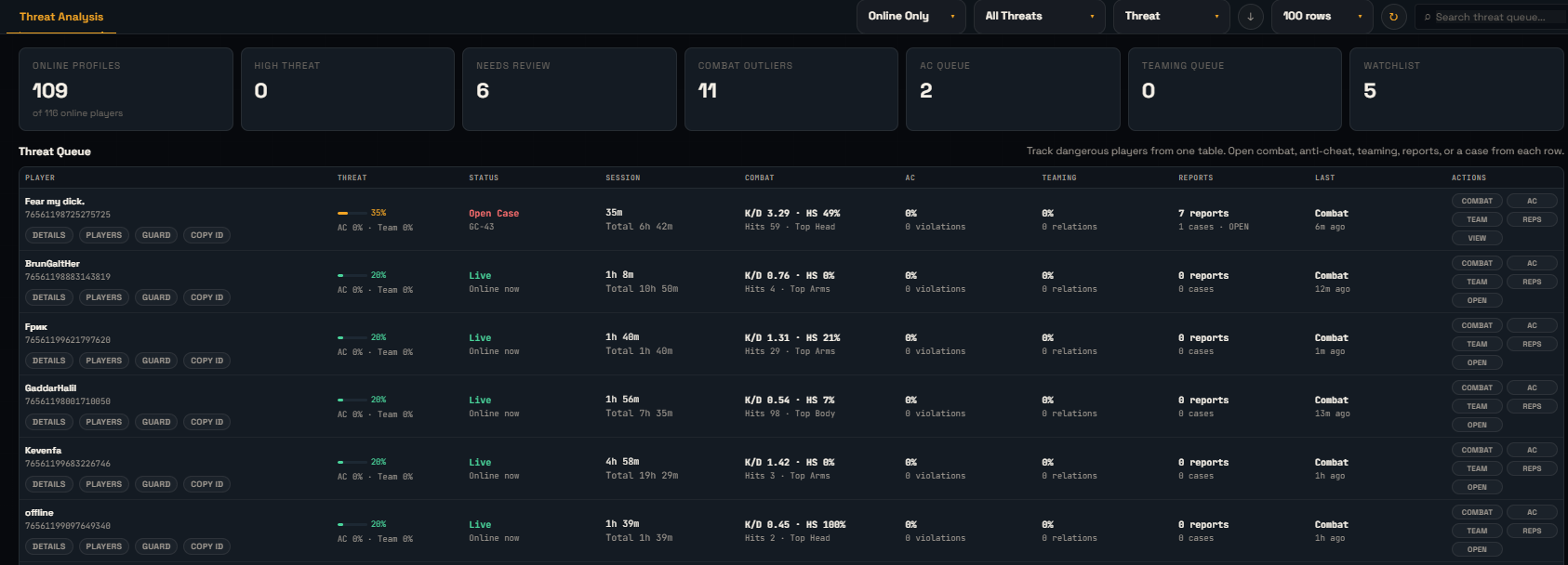
Threat analysis pulls combat risk, anti-cheat signals, teaming risk, reports, and review status into one queue so staff can prioritize instead of manually hunting through logs.

  • Sort by threat, PvP kills, deaths, headshots, HS rate, or last combat
  • Filter for watchlist, combat risk, anti-cheat risk, or teaming risk
  • Open combat details, reports, cases, and player actions from each row
  • Built for busy staff teams that need a focused review queue
AegisRcon threat analysis queue
Reports & Cases

Custom report cases with evidence attached

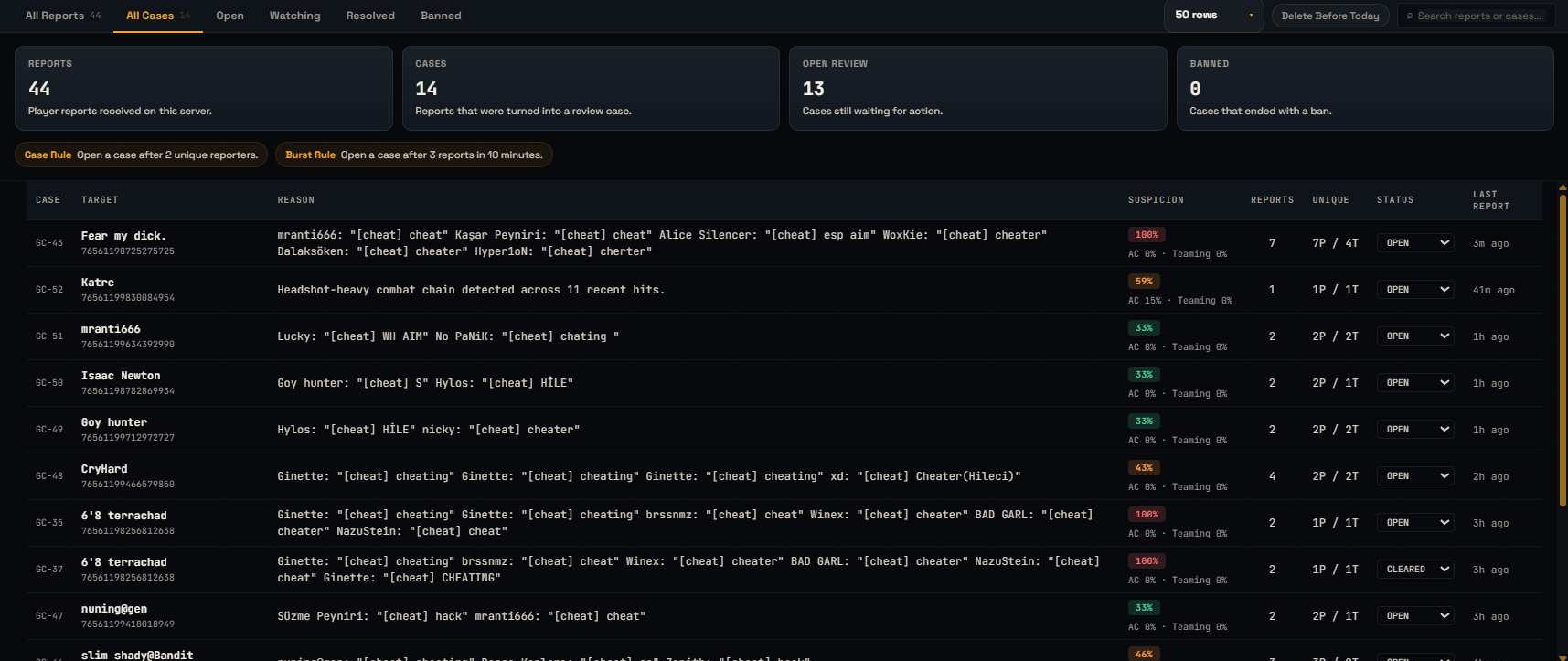
Raw reports and promoted cases share one workflow. Staff can search, filter, watch, resolve, ban, and keep notes around the player and evidence that caused the review.

  • All reports and case status in one table
  • Open, watching, resolved, and banned states
  • Case promotion rules from server settings
  • Evidence, reason, target, reporter, and moderation action context
AegisRcon reports and case management
Live Map

Live map for fast incident response

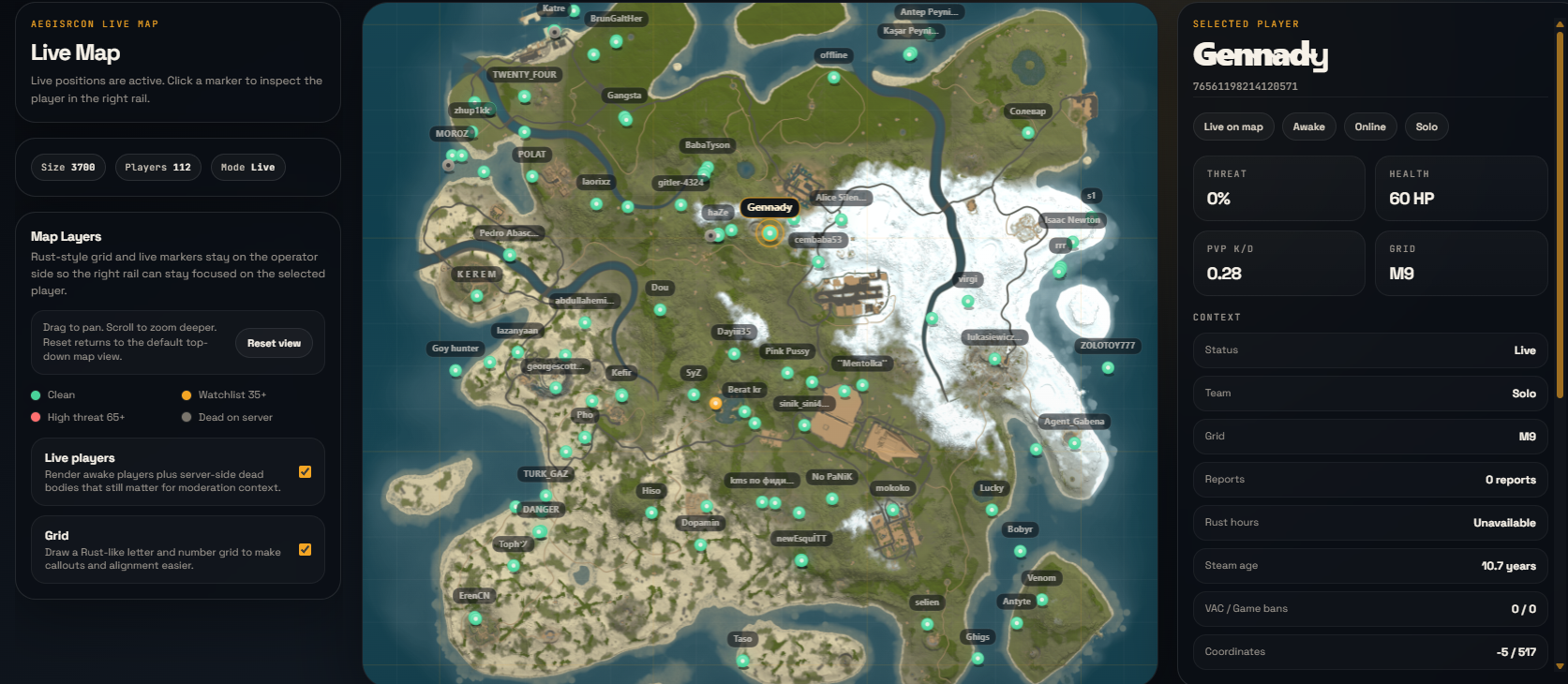
Watch live player markers, map grid, selected-player context, team information, and moderation shortcuts from one map workspace.

  • Player positions and status on a Rust-style map
  • Threat-colored markers and selected-player details
  • Pan, zoom, reset view, and inspect markers
  • Open player actions without leaving the map
AegisRcon Rust live map
Trigger Automation

Automate almost any repeatable staff workflow

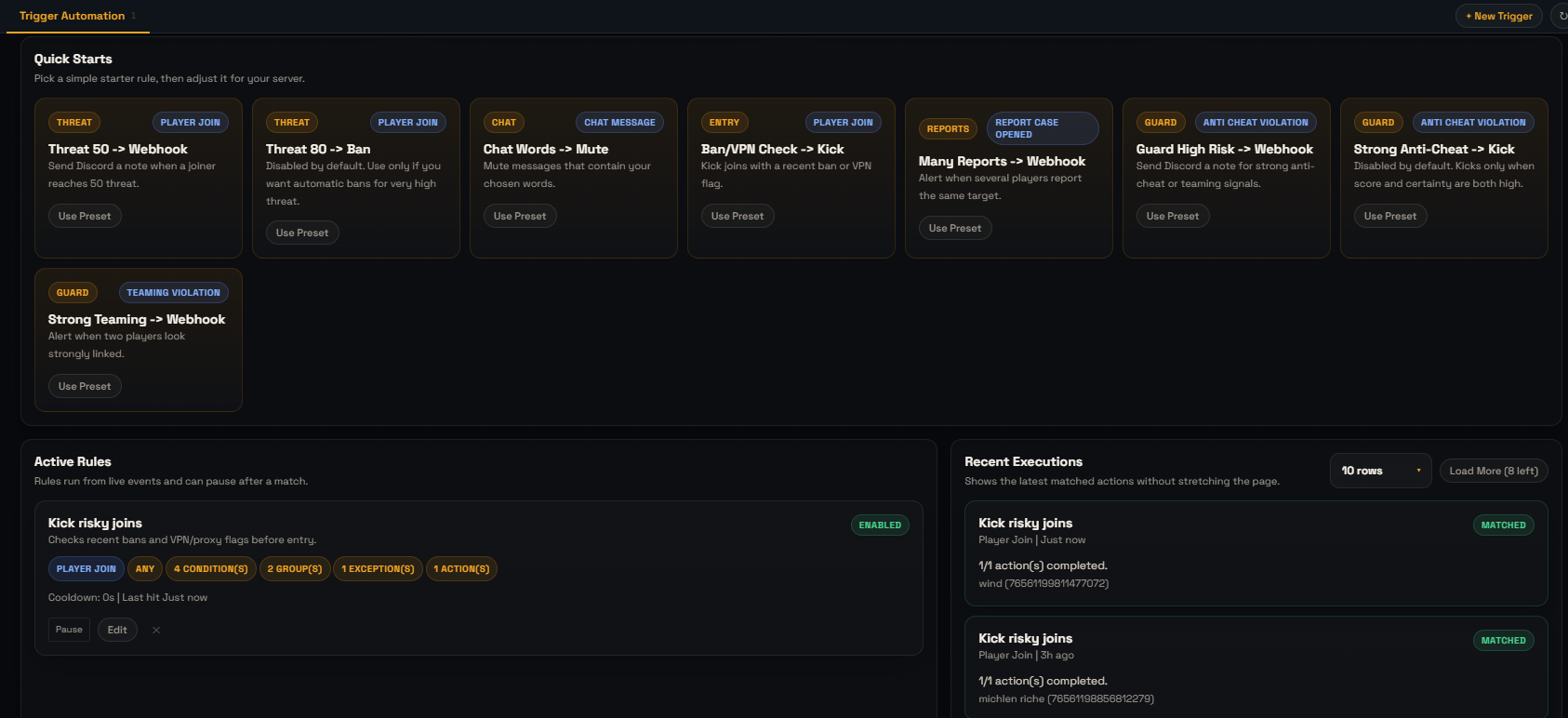
Build rules from live events and conditions, then run actions when the rule matches. Use it for join checks, VPN/shared-IP handling, chat filters, report routing, Guard signals, webhooks, notes, kicks, bans, and custom RCON actions.

  • All/any match logic, nested groups, cooldowns, and SteamID exceptions
  • Starter presets for common Rust moderation flows
  • Actions for alerts, notes, webhooks, commands, kicks, bans, and review paths
  • Recent execution feed so automation never becomes invisible
AegisRcon trigger automation builder
Scheduler & Dynamic Slots

Scheduled commands and adaptive slot control

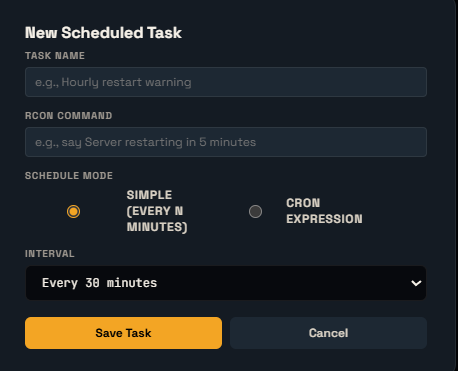
Schedule routine commands and let Dynamic Slots adjust server capacity based on live population, queue, FPS, cooldowns, and configured min/max slot rules.

  • Simple interval or cron-style scheduled RCON commands
  • Dynamic slot min/max, step up/down, FPS thresholds, free-slot rules, and cooldown tuning
  • Manual slot apply and restore-original controls
  • Change feed showing exactly why slot changes happened
AegisRcon scheduler and dynamic server tools
Plugin Health

Plugin health and addon status without console digging

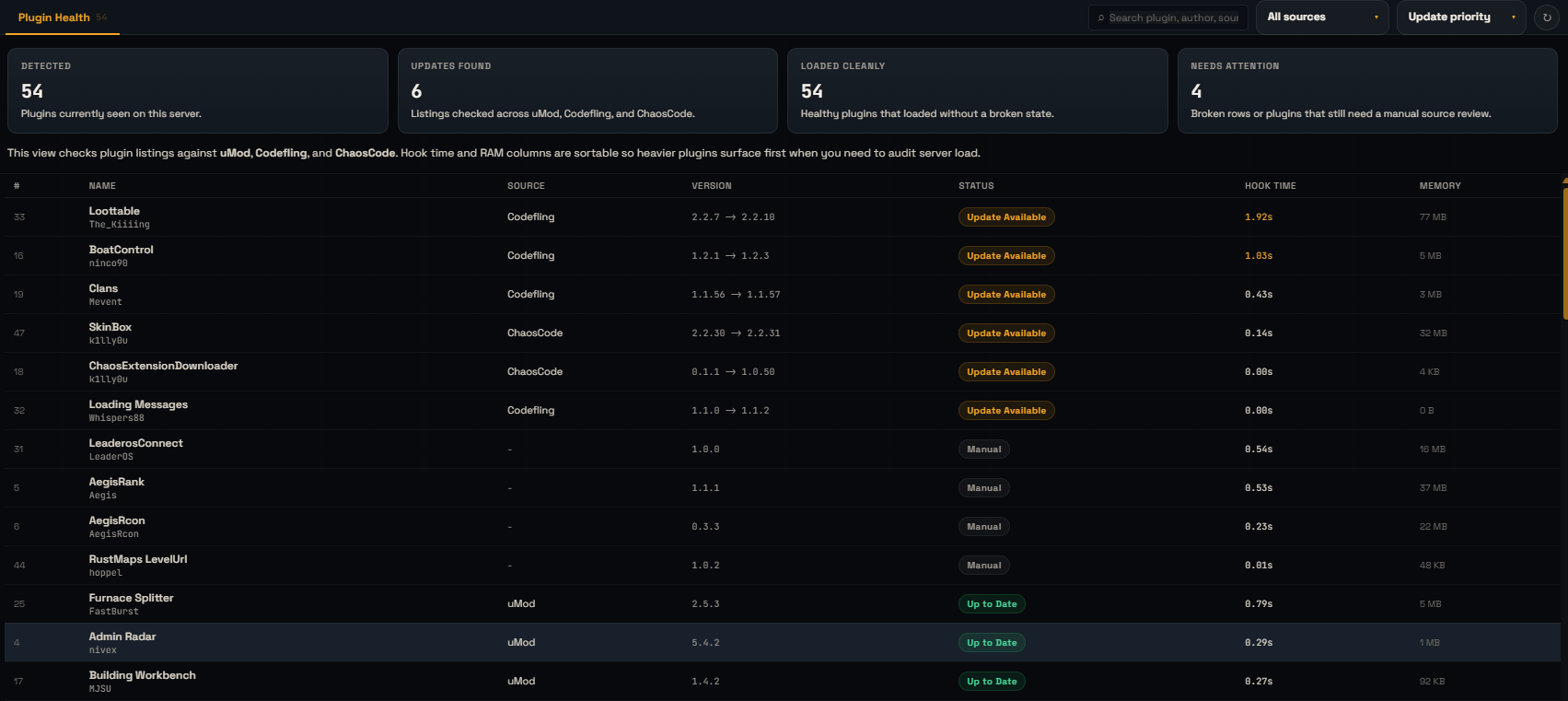
See loaded plugins, sources, update priority, hook time, memory, broken states, and the AegisRcon plugin bridge from the same tools area.

  • Plugin list with source, version, status, hook time, and memory
  • Sort by update priority, hook time, memory, or name
  • AegisRcon plugin and AegisRank addon status cards
  • Install flow and capability status for the Rust bridge
AegisRcon plugin health view
Permissions

Oxide group permissions from the panel

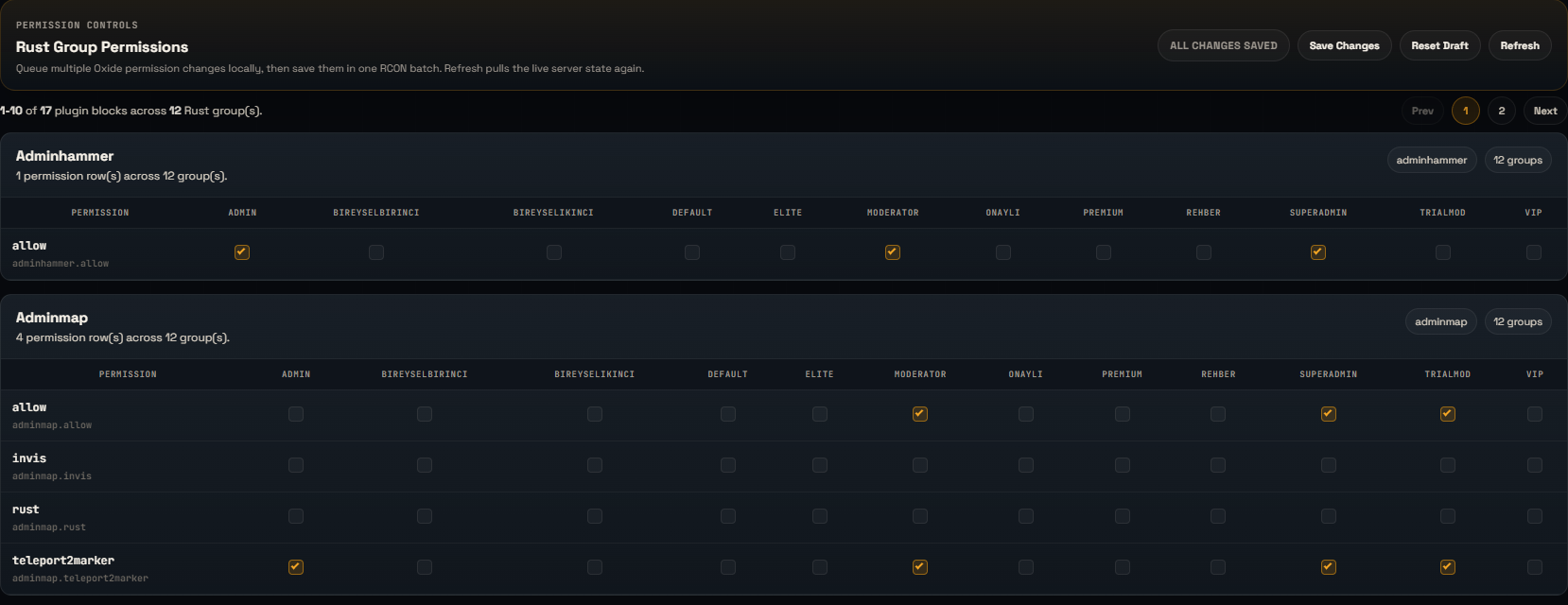
Review plugin permissions by group, search through permission names, page large plugin lists, and grant or revoke routine permissions without typing raw console commands.

  • See plugins and groups in one view
  • Grant and revoke per group
  • Search plugin or permission names
  • Safer day-to-day permission handling
AegisRcon permission management
Detailed Statistics

Deep server statistics without the screenshot yet

The statistics workspace tracks population flow, traffic, countries, daily rhythm, weekday load, and raw buckets. This section is intentionally image-free for now; the screenshot can be added after the data fills over the next week.

  • 24h, 7d, and 14d analytics ranges
  • Players, peaks, queue, joins, and new-player traffic
  • Country breakdown, hourly rhythm, weekday load, and bucket tables
  • Designed for operators who want more than a single online-player number
Coming Screenshot

Statistics screenshot will be added after the dataset fills.

Until then, the feature details stay visible without showing an empty analytics panel.

AegisRank Addon

Configurable ranking with a public page

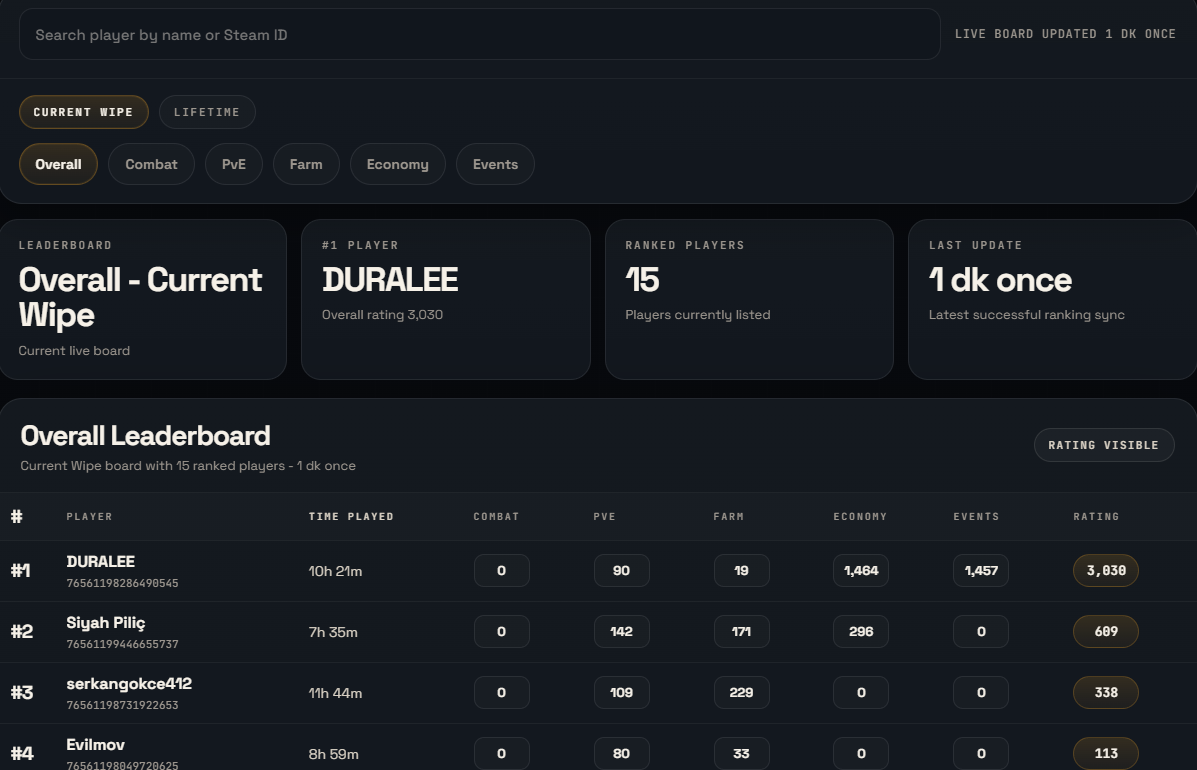
AegisRank is a separate addon for Pro and Max accounts. It can expose a public stats page, chat-first rank output, categories, and per-server presentation controls.

  • Separate AegisRank plugin and account-level addon access
  • Public stats page with search, category tabs, summaries, and server branding
  • Configurable points, titles, colors, visible columns, categories, and output style
  • Enable or disable per server without using another server slot
AegisRank addon configuration and public page
How it works

Connect first. Turn on full coverage after.

Start with RCON, install the lightweight AegisRcon plugin for deeper Rust signals, then decide which Pro/Max features your staff actually needs.

01

Add your server

Enter your RCON details, add the server, and use the Free tab-active session to confirm the basic workflow.

02

Install the plugin for full features

To use Guard, live map, team context, dynamic slots, plugin bridge data, and deeper Rust signals, install the AegisRcon plugin.

03

Keep the heavy work on our side

Persistent RCON, statistics, cases, triggers, history, review queues, and operator workflows stay in AegisRcon while the Rust plugin stays focused on lightweight bridge data.

Ready to set up?

Bring the Rust panel online.

Start with one server, confirm the workflow, then expand from there.